Shopping · Kaufland
Kaufland Search API
The Kaufland Search API gets you live Kaufland data the moment you ask, as clean, structured data – ready for your own app, a spreadsheet or an AI assistant. No scraping, nothing to maintain.
100 free requests every month · no credit card · one API key for all platforms
Key facts
Updated
Searching kaufland.de for a generic term such as "Konsole" returns a marketplace-style mix: game consoles next to console tables, thousands of sellers, sponsored tiles from merchants who paid for visibility and a result count that Kaufland caps at 10,000. The everydata.io Kaufland Search API returns those result pages as JSON, one call per page, with the six sort orders of the storefront – so you can observe rankings, sweep a category by price or find every listing of a product across sellers.
- Platform
- Kaufland
- Main endpoint
- /product/search
- Quota per call
- 1 request
- Free plan
- 100 req / monththen from €30 / month
What the Kaufland Search API returns
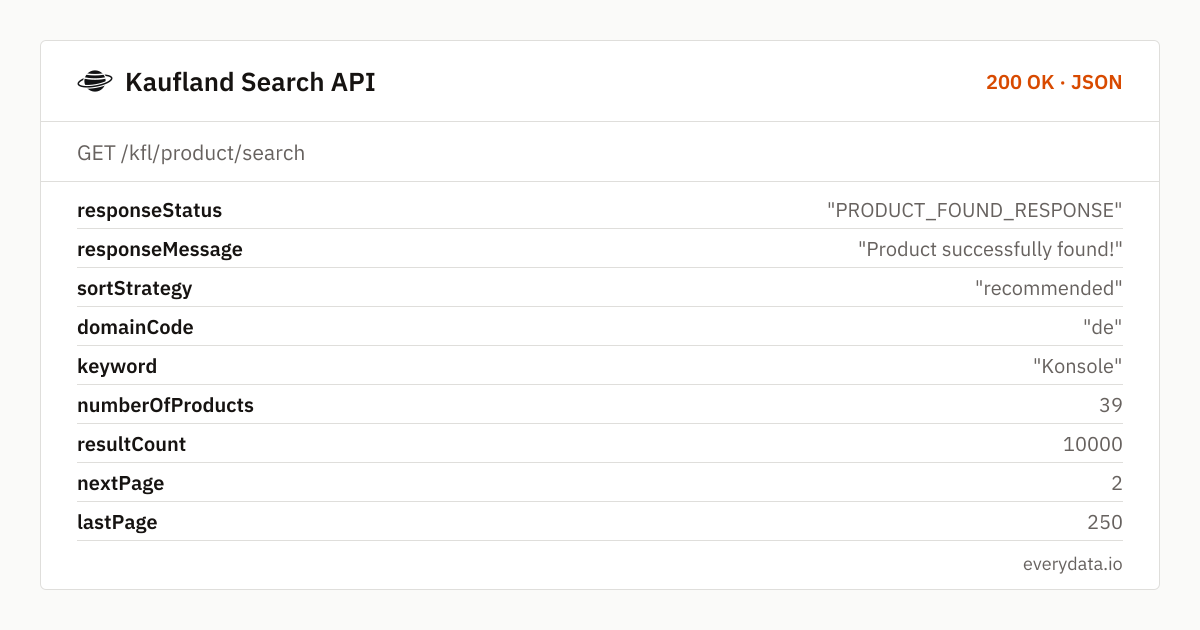
Each response opens with the request echo and paging state: keyword, sortStrategy, numberOfProducts on this page (typically around 40), resultCount as reported by Kaufland, nextPage and lastPage. A "Konsole" search shows 10,000 hits over 250 pages – Kaufland's ceiling, not the real assortment size, so treat resultCount as "at least".
searchProductDetails holds the tiles. Each item lists productDescription (the listing title, often long and keyword-stuffed by sellers), manufacturer, productId, variationId, price and retailPrice in EUR, productRating and countReview when the listing has ratings, imgUrl in 200×200, the absolute dpUrl of the product page, a deliveryMessage with Kaufland's delivery window ("Lieferung Fr. 2. - Do. 8. Oktober") and a sponsored flag.
- keyword, sortStrategy, numberOfProducts, resultCount, nextPage and lastPage
- Per tile: productDescription, manufacturer, productId, variationId, imgUrl and absolute dpUrl
- price and retailPrice as numbers – no string parsing
- productRating and countReview where the listing has reviews
- deliveryMessage with the concrete delivery date range for the default offer
- sponsored flag to separate paid merchant placements from organic ranking
- sortBy: recommended (default), price-asc, price-desc, customer-reviews, newest-arrivals, bestsellers
What teams build with the Kaufland Search API
Cross-seller price discovery
Search a model name with price-asc to find the cheapest listing among all merchants, then open dpUrl to read the soldBy and shipping cost of that offer.
Marketplace rank tracking
Sellers track the position of their productId for their core keywords under recommended and bestsellers and watch how sponsored competitors shift the organic order.
Assortment intelligence
Poll a category term with newest-arrivals and diff productIds to see which merchants add listings, which brands enter kaufland.de and how quickly new products earn reviews.
Delivery-window benchmarking
Aggregate deliveryMessage across a term to measure typical lead times on the marketplace and to spot offers with unusually long shipping windows.
Catalogue seeding
Collect dpUrls for a whole category as the input list for the product endpoint, building a structured dataset of titles, sellers and specs.
Kaufland Search API: example request and response
Use GET /kfl/product/search with keyword and page (both required). Add sortBy to reproduce a specific storefront order. Because Kaufland's dpUrl is already absolute, you can hand each result straight to GET /kfl/product/details for the seller and stock line.
GET /kfl/product/search
curl "https://api.everydata.io/kfl/product/search?keyword=Konsole&page=1&sortBy=recommended" \
  -H "x-api-key: YOUR_API_KEY"
Response (shortened)
{
  "responseStatus": "PRODUCT_FOUND_RESPONSE",
  "responseMessage": "Product successfully found!",
  "sortStrategy": "recommended",
  "domainCode": "de",
  "keyword": "Konsole",
  "numberOfProducts": 39,
  "resultCount": 10000,
  "nextPage": 2,
  "lastPage": 250,
  "searchProductDetails": [
    {
      "productDescription": "LITTLE TREE Konsolentisch, Beistelltisch, Flurtisch, Sofatisch für kleinen Raum, Konsolentisch mit Stauraum für Eingang, Flur, Wohnzimmer, Braun",
      "manufacturer": "Wanbor",
      "productId": "506827780",
      "variationId": "506827780",
      "countReview": 9,
      "imgUrl": "https://media.cdn.kaufland.de/product-images/200x200/2964f233238ba0212891e092d4d59797.jpg",
      "price": 109.99,
      "retailPrice": 0,
      "productRating": "5.0",
      "dpUrl": "https://www.kaufland.de/product/506827780/",
      "deliveryMessage": "Lieferung Di. 22. - Fr. 25. September",
      "sponsored": false
    }
  ]
}
The search tile does not name the seller. When you need soldBy, shippingPrice or the scarcity sentence, follow dpUrl into the product endpoint; the search layer is for discovery and ranking, the details layer for offer data. Fields that Kaufland does not render on a tile (productRating for unrated items, manufacturer for some sellers) are simply absent from that entry, so code defensively.
sortBy=price-asc is the fastest way to find the cheapest offer for a specific model: search the exact product name, take page one and you have the lowest price across sellers with its productId. sortBy=bestsellers reveals which listings Kaufland's customers actually buy for a term, independent of paid placement.
Use withCache when several jobs query the same keyword within an hour – the cached page is shared and you keep realtime requests for terms that change.
Related endpoints
Search products. Keyword search with paging and sorting: price, rating, delivery time and sponsored flag per result.
Product details. Product page by URL: default offer with seller, price, shipping, stock line, variants, specs and images.
Reviews. Paged customer reviews by Kaufland product ID.
Kaufland Search API pricing: pay per request
One search page equals one request; a page returns up to about 40 tiles. Following 40 keywords across pages one and two daily is around 2,400 requests a month – comfortably inside Starter (5,000 requests, €30). If you also open every tile in the product endpoint, budget one extra request per product; Production (50,000, €80) covers that for mid-sized sweeps.
- Free
- 100 req / month
- Starter
- 5,000 req · €30
- Production
- 50,000 req · €80
- Business
- 300,000 req · €300
Kaufland Search API: frequently asked questions
Which sort orders can I request?
recommended (default), price-asc, price-desc, customer-reviews, newest-arrivals and bestsellers – the same options as the kaufland.de sort menu. sortStrategy in the response confirms what was applied.
Why does resultCount show 10,000 for many terms?
Kaufland caps the reported hit count at 10,000 and the pager at 250 pages. Narrow the keyword (add brand or model) to get an exact count and a manageable number of pages.
Does the search tell me who sells the product?
No, soldBy is only available on the product page. Call GET /kfl/product/details with the tile's dpUrl to see the merchant, shippingPrice and stock sentence.
Can I search within a category or filter by brand?
The endpoint takes keyword, page and sortBy. Put the brand or category term into the keyword and filter manufacturer or price on your side from the returned fields.
Are sponsored listings marked?
Yes, each tile carries sponsored: true or false in the position Kaufland shows it, so you can compute the organic ranking by filtering.
Related use cases

Run your first kaufland.de search
Free account, one GET request, a full result page as JSON – sorted the way your shoppers sort.