Shopping · Kaufland
Kaufland Product Data API
The Kaufland Product Data API gets you live Kaufland data the moment you ask, as clean, structured data – ready for your own app, a spreadsheet or an AI assistant. No scraping, nothing to maintain.
100 free requests every month · no credit card · one API key for all platforms
Key facts
Updated
Kaufland.de is not a single-retailer shop. Behind most product pages stands a third-party merchant – the page names the seller in a "Verkauf durch …" line, several sellers can compete for the same article, and a Nintendo Switch Lite in turquoise is a different product id than the same console in yellow. The everydata.io Kaufland Product Data API takes a kaufland.de/product/<id>/ URL and returns the listing as one JSON document, including the seller currently holding the offer, the stock warning, the specification table and every colour variant with its own product URL.
- Platform
- Kaufland
- Main endpoint
- /product/details
- Quota per call
- 1 request
- Free plan
- 100 req / monththen from €30 / month
What the Kaufland Product Data API returns
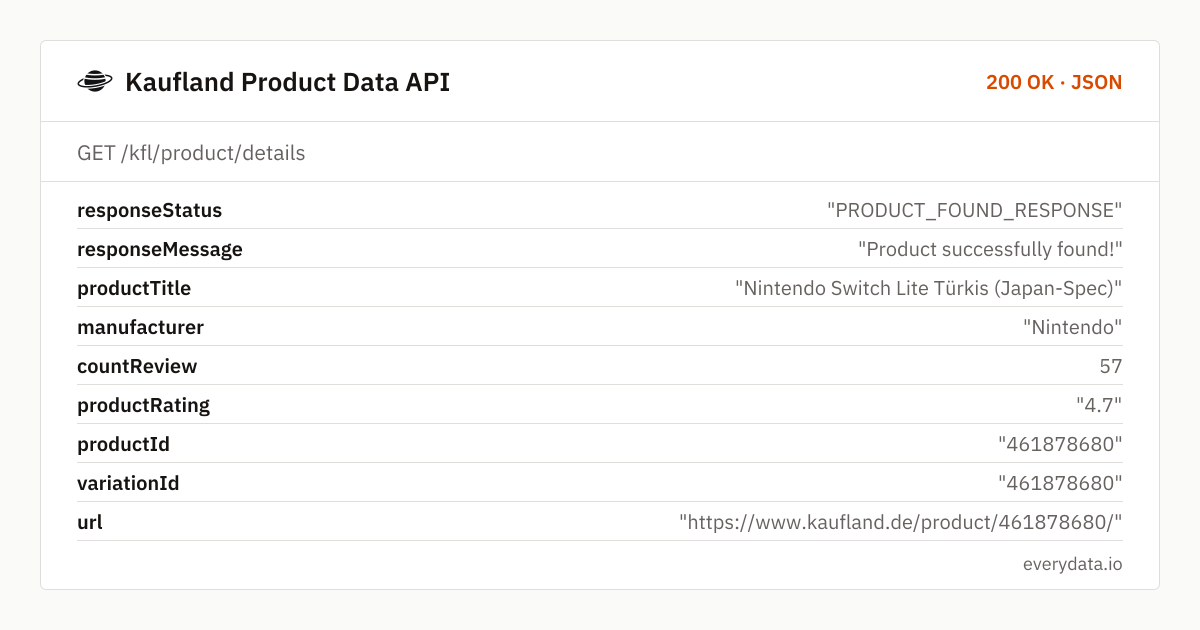
The response carries the product identity first: productTitle, manufacturer, productId (Kaufland's numeric id, repeated as asin for compatibility with our other retail endpoints) and the canonical url. productRating and countReview reflect the aggregate – 4.7 from 57 reviews in the example below – while productDescription and the productDetails key/value list (Modell, Hersteller, Maße, Lieferumfang) hold the German content the seller uploaded.
Marketplace context is where Kaufland differs from Otto or Lidl. soldBy names the merchant behind the current offer, warehouseAvailability carries the scarcity or stock sentence Kaufland shows – "Nur noch 1 zu diesem Preis" or "Nur noch 5 Stück auf Lager" – and price plus shippingPrice describe that merchant's offer in EUR. imageUrlList lists media.cdn.kaufland.de images in 1024×1024.
variations groups the colour or size dimension (variationName "Farbe") and each value carries its own dpUrl, asin, available flag, image and, where the seller sets one, price. Because Kaufland creates a separate product page per variant, dpUrl is what you pass into the next call to cover the whole family.
- productTitle, manufacturer, productDescription and the productDetails specification table
- soldBy – the marketplace merchant behind the displayed offer
- warehouseAvailability with Kaufland's stock and scarcity messages
- price and shippingPrice as numeric EUR fields, retailPrice where a strike-through price exists
- productRating and countReview aggregated across the listing
- imageUrlList and mainImage from media.cdn.kaufland.de
- variations[] with per-variant dpUrl, asin, available, imageUrl and price
What teams build with the Kaufland Product Data API
Marketplace seller monitoring
Brands re-fetch their catalogue on kaufland.de to see which merchant currently holds each offer, whether unauthorised resellers appear and whether product content was altered.
Catalogue matching for cross-listing
Sellers who list on Amazon or Otto match their articles against kaufland.de listings via title, manufacturer, productDetails and images before creating or claiming an offer.
Variant-family crawling
Start from one colour and follow every dpUrl in variations[] to collect the price, availability and seller for the whole product family in a handful of requests.
Comparison-shopping feeds
Price comparison sites show the kaufland.de offer with seller name, shipping cost and the scarcity line, so users understand why an offer is cheap and how long it may last.
Kaufland Product Data API: example request and response
Call GET /kfl/product/details with the product URL. The short form https://www.kaufland.de/product/<id>/ is sufficient; the long browser URL with id_unit and tracking parameters works too. Only GET requests are needed – no session, no cookies, no proxy setup.
GET /kfl/product/details
curl "https://api.everydata.io/kfl/product/details?url=https%3A%2F%2Fwww.kaufland.de%2Fproduct%2F461878680%2F" \
  -H "x-api-key: YOUR_API_KEY"
Response (shortened)
{
  "responseStatus": "PRODUCT_FOUND_RESPONSE",
  "responseMessage": "Product successfully found!",
  "productTitle": "Nintendo Switch Lite Türkis (Japan-Spec)",
  "manufacturer": "Nintendo",
  "countReview": 57,
  "productRating": "4.7",
  "productId": "461878680",
  "variationId": "461878680",
  "url": "https://www.kaufland.de/product/461878680/",
  "soldBy": "Verkauf durch Schnaeppchen-Schuppen",
  "warehouseAvailability": "Nur noch 1 zu diesem Preis",
  "retailPrice": 0,
  "price": 219,
  "shippingPrice": 0,
  "imageUrlList": [
    "https://media.cdn.kaufland.de/product-images/1024x1024/da0ffe417ca13e74d7587ea5a9a3467f.jpg"
  ],
  "productDetails": [
    {
      "name": "Modell",
      "value": "Switch Lite"
    },
    {
      "name": "Hersteller",
      "value": "Nintendo"
    }
  ],
  "variations": [
    {
      "variationName": "Farbe",
      "values": [
        {
          "value": "Gelb",
          "dpUrl": "https://www.kaufland.de/product/461878683/",
          "selected": false,
          "available": true,
          "retailPrice": 0,
          "asin": "461878683"
        }
      ]
    }
  ]
}
soldBy is the field to read before you trust a price. Kaufland shows the cheapest eligible offer by default, so the seller can change between two calls while productId stays the same; the sentence includes the shop name exactly as Kaufland prints it ("Verkauf durch gobuytech"). sellerId is present but short and not always meaningful – key your seller table on the soldBy name.
warehouseAvailability is a free-text sentence, not a number. "Nur noch 1 zu diesem Preis" means the current offer is limited, not that the product is nearly gone – another seller may list more units at a higher price. Parse it for the digit if you need a quantity, but store the original text as well.
If the id does not exist you receive a 404 with statusMessage "not found for parameter". Manufacturer can be null when the seller did not fill it, and imageUrlList may be empty for thin listings – both are honest reflections of the page, not parser gaps.
Related endpoints
Product details. Product page by URL: default offer with seller, price, shipping, stock line, variants, specs and images.
Reviews. Paged customer reviews by Kaufland product ID.
Search products. Keyword search with paging and sorting: price, rating, delivery time and sponsored flag per result.
Kaufland Product Data API pricing: pay per request
A product page is one request regardless of seller count or variant number. The free tier's 100 requests a month cover prototyping; Starter (5,000 requests, €30) refreshes about 160 Kaufland listings daily, Production (50,000, €80) about 1,600, and Business (300,000, €300) roughly 10,000. Upstream 5xx responses are never billed.
- Free
- 100 req / month
- Starter
- 5,000 req · €30
- Production
- 50,000 req · €80
- Business
- 300,000 req · €300
Kaufland Product Data API: frequently asked questions
Does the response list all sellers for a product?
It returns the offer Kaufland displays as the default – normally the cheapest – with its soldBy, price and shippingPrice. Other sellers' offers are not enumerated; polling over time shows you which merchants win the default slot.
Which URL format should I pass?
https://www.kaufland.de/product/<productId>/ is enough. Long URLs with id_unit or campaign parameters are accepted and normalised into the url field of the response.
Are colour or size variants separate products?
Yes. Each variant has its own productId and page; the variations array gives you every sibling with dpUrl, asin and available so you can request them individually.
Is Kaufland only available for Germany?
This endpoint covers kaufland.de, the German marketplace, with prices in EUR including VAT and German-language content. There is no domainCode parameter.
Where do I get the customer reviews?
GET /kfl/product/reviews with productId and an optional page returns the reviews with rating, title, text, date, the variant the reviewer bought and a verified flag.
Related use cases


Look up your first kaufland.de product
Register for free, paste a kaufland.de product URL and get seller, price, stock line and variants as JSON – 100 requests a month included.