Apps · Google Play

Google Play Store Scraper API for Reviews
The Google Play Store Scraper API for Reviews gets you live Google Play data the moment you ask, as clean, structured data – ready for your own app, a spreadsheet or an AI assistant. No scraping, nothing to maintain.
100 free requests every month · no credit card · one API key for all platforms
Key facts
Updated
A Google Play Store scraper is mostly about reviews: what users praise, what breaks after an update, how the developer answers. The everydata.io Google Play Store Scraper API returns the reviews of any Android app as JSON – 40 per page with star rating, text, date, thumbs-up count, the app version the review was written for and the developer reply – sorted by newest, most relevant or rating, for any store country and language. App details with the rating histogram and keyword search come from the same API, so you can scrape Google Play without a browser, an Android device or an account.
- Platform
- Google Play
- Main endpoint
- /googleplay-lookup-reviews
- Quota per call
- 1 request
- Free plan
- 100 req / monththen from €30 / month
What the Google Play Store Scraper API for Reviews returns
Each review carries reviewId, rating (1 to 5), text, date, thumbsUp, appVersion and developerReply with its own text and date, or null when the developer has not answered. User names and avatars are never returned. The response repeats appId, lang, country and sortBy, counts the reviews on the page in reviewCount and hands you nextPageToken for the next 40.
The app details call adds the numbers that put reviews in context: rating and ratingCount, reviewCount, the histogram with the count of every star level, installs, minInstalls and realInstalls, version, updatedAt and releasedAt, recentChanges (the release notes), price, currency and free, contentRating, containsAds and inAppPurchases. Keyword search returns up to 30 apps per store country and language with appId, title, developer, rating, installs and price, which is how you find the competitors to scrape next.
- 40 reviews per page with rating, text, date, thumbsUp and appVersion
- developerReply with text and date, or null when there is no answer
- sortBy newest (default), mostRelevant or rating; nextPageToken for paging
- Any store country and language via country and lang (default US / en)
- App details: rating, ratingCount, histogram, installs, version, updatedAt, recentChanges
- Keyword search with up to 30 apps, and all apps of a developer
- No user names or avatars in reviews
What teams build with the Google Play Store Scraper API for Reviews
Review monitoring
Poll the newest reviews of your app every day, alert on 1- and 2-star reviews and route them to support before they pile up.
Release quality tracking
Group ratings by appVersion and compare the share of low ratings before and after each release, next to the release notes in recentChanges.
Competitor review mining
Scrape the reviews of competing apps found via keyword search and collect the features users ask for and the bugs they complain about.
Sentiment and topic analysis
Feed review text, rating and thumbsUp into your NLP pipeline to rank topics by how many users agree with them.
App store optimization (ASO)
Track rating, ratingCount, histogram and installs of your app and its competitors per country, and check which apps rank for a keyword.
Google Play Store Scraper API for Reviews: example request and response
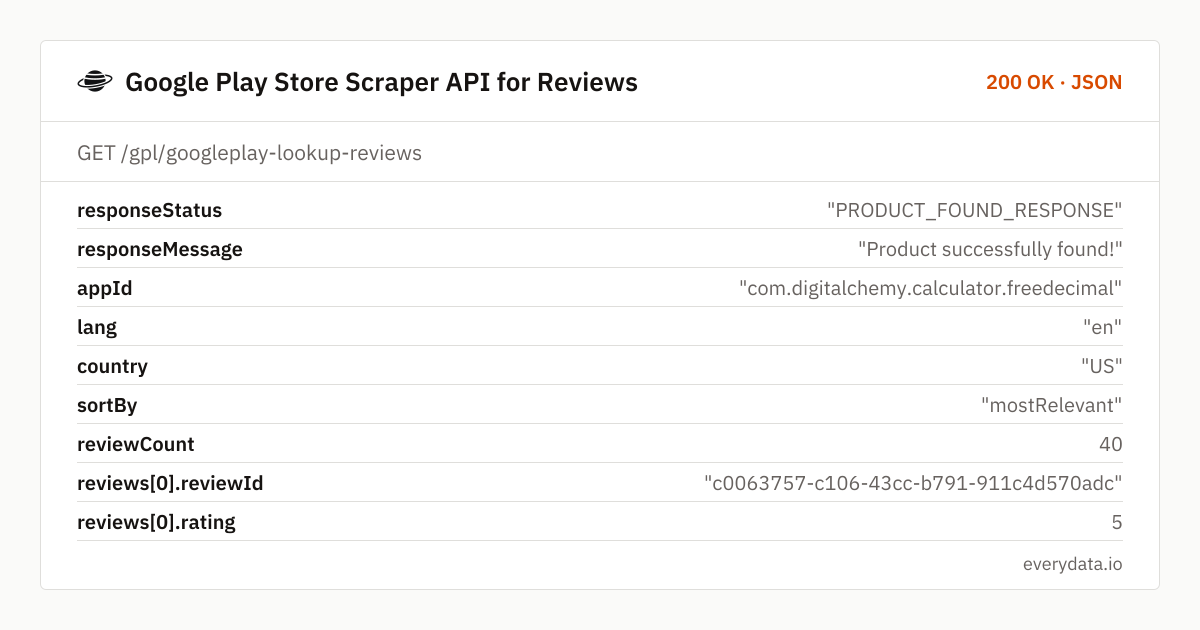
Call GET /gpl/googleplay-lookup-reviews with the package name in appId – the id= part of the Play URL – or pass the whole Play URL in url. The example asks for the most relevant US reviews of a calculator app; the response is shortened to two of the 40 reviews.
GET /gpl/googleplay-lookup-reviews
curl "https://api.everydata.io/gpl/googleplay-lookup-reviews?appId=com.digitalchemy.calculator.freedecimal&lang=en&country=US&sortBy=mostRelevant" \
  -H "x-api-key: YOUR_API_KEY"
Response (shortened)
{
  "responseStatus": "PRODUCT_FOUND_RESPONSE",
  "responseMessage": "Product successfully found!",
  "appId": "com.digitalchemy.calculator.freedecimal",
  "lang": "en",
  "country": "US",
  "sortBy": "mostRelevant",
  "reviewCount": 40,
  "reviews": [
    {
      "reviewId": "c0063757-c106-43cc-b791-911c4d570adc",
      "rating": 5,
      "text": "This is a excellent calculator with great convenience for the user. I found myself using it when calculating the cost, math, and all of that stuff. I also found that the Pro version has a 12 dollars …",
      "date": "2025-10-30T16:02:31Z",
      "thumbsUp": 173,
      "appVersion": "8.1.2",
      "developerReply": null
    },
    {
      "reviewId": "b2152fce-19b1-47b9-8596-9e053cb99d28",
      "rating": 1,
      "text": "Update 11/24/25: So shortly after I made my review complaining about the new pop-up ads every time I opened the free verson, I caved and purchased the full/pro version to stop the ad pop ups...so mon…",
      "date": "2025-11-24T16:17:08Z",
      "thumbsUp": 150,
      "appVersion": "8.1.3",
      "developerReply": {
        "text": "Hello!\n\nThank you for using Calculator Plus and reporting this situation with us!\n\nAn issue like this is commonly connected with having multiple Google Play accounts on the device and how Google Play…",
        "date": "2025-11-24T18:03:09Z"
      }
    }
  ]
}
The two reviews show why appVersion matters: the 5-star review was written for version 8.1.2, the 1-star complaint about new pop-up ads for 8.1.3, and the developer answered it within two hours. Group reviews by appVersion and you see what a release changed for users.
For more reviews, send the same request again with nextPageToken from the previous response; each page is one request with up to 40 reviews. Use sortBy=newest (the default) when you poll for new reviews, mostRelevant for the reviews Google Play shows first, and rating to sort by stars.
Reviews differ by store: country and lang decide which reviews you get and in which language, just like on the Play Store itself. For the overall picture, call GET /gpl/googleplay-lookup-app with the same appId – the histogram gives the count of 1- to 5-star ratings across all users.
Related endpoints
Reviews. 40 reviews per page (newest, most relevant or by rating) with developer replies; token paging.
App details. App page by package name or Play URL: developer, description, screenshots, price, rating, installs, version, dates.
Search apps. Keyword search per store country and language (up to 30 apps).
Developer apps. Apps of a developer by developer id or name.
Google Play Store Scraper API for Reviews pricing: pay per request
Each page of 40 reviews is one request, and so is an app lookup or a keyword search. Polling the newest page of reviews for 50 apps once a day is about 1,500 requests a month – the Starter plan (5,000 requests, €30). Pulling the full review history of a few hundred apps fits Production (50,000 requests, €80). The free plan includes 100 requests a month, and errors on Google Play's side are never billed.
- Free
- 100 req / month
- Starter
- 5,000 req · €30
- Production
- 50,000 req · €80
- Business
- 300,000 req · €300
Google Play Store Scraper API for Reviews: frequently asked questions
How do I scrape all reviews of a Google Play app?
Call /gpl/googleplay-lookup-reviews with appId, then repeat the call with nextPageToken from each response. Every page returns up to 40 reviews; stop when nextPageToken is null.
Can I get reviews for a specific country or language?
Yes. Pass country (two-letter store country, default US) and lang (default en), for example country=DE&lang=de for the German Play Store.
Does the API return reviewer names?
No. Reviews carry reviewId, rating, text, date, thumbsUp, appVersion and the developer reply, but no user names or avatars.
Do I need the package name?
Either the package name in appId (for example com.whatsapp) or the full Play URL in url. To find a package name, search by keyword with /gpl/googleplay-search-apps – every result has its appId.
Is there an App Store version?
Yes. The App Store API under /aps uses the same field names for app details, so iOS and Android data fit the same table.
Related use cases


Scrape your first Google Play reviews
Create a free account, pass a package name and get 40 reviews with ratings and developer replies as JSON – 100 requests a month included.